Blackboard vs Calibr
Which Platform delivers the best value: A Comprehensive Comparison
While Blackboard Learn offers a comprehensive suite of academic-focused tools backed by decades of higher education experience, Calibr stands out as the best Blackboard Learn alternative for organizations prioritizing intuitive design, faster implementation, modern user experience, and measurable business outcomes. Where Blackboard excels in traditional academic settings with complex course structures, Calibr delivers streamlined corporate training that drives engagement and performance from day one.
Course Creation with AI
More Affordable Pricing
Average Skill Growth Rate
TL;DR — Blackboard vs Calibr
Calibr Highlights
- Advanced course authoring with flexible, engaging content creation
- AI-powered personalized learning paths across roles and skills
- Rapid deployment and faster time-to-value
- Modern, intuitive interface requiring minimal training
- Real-time analytics focused on business impact
- Affordable transparent pricing ($2–$5/user/month)
Blackboard Highlights
- Longer implementation timelines for thorough setup
- Designed primarily for academic institutions rather than corporate organizations
- Comprehensive assessment and grading tools
- Budget for premium pricing and potential add-on module costs
Why Calibr Leads:
85% faster course creation
with AI-powered authoring
45% faster skill development
vs. industry average
ROI achieved in 10 months
vs. 16-month average
Predictable, transparent pricing
with all features included
Bottom Line: Calibr emerges as the best Blackboard Learn alternative for organizations seeking a modern, business-focused LMS that combines powerful features with exceptional usability. While Blackboard Learn serves traditional academic institutions well, Calibr delivers faster ROI, superior user adoption, and the agility today's learning organizations demand.
Quick Comparison: Blackboard vs Calibr
See how Calibr and Blackboard stack up across critical capabilities
AI-Powered Content Creation
Advanced drag-and-drop builder with AI-assisted content creation, multimedia support
Basic AI-assisted tools
Why It Matters: Reduces content creation time and external tool dependency
Personalized Learning
AI-driven learning paths, adaptive assessments and skill-gap analysis
Limited adaptive features
Why It Matters: Personalized learning increases engagement by 40%
Pricing Model
Starting at $2/user/month
Predictable costs enable better budget planning
Why It Matters: Optimizes costs as your organization scales
User Interface
Modern, intuitive interface with minimal training needed, customizable learner dashboard
Traditional, academic-oriented interface
Why It Matters: User adoption rates directly impact training effectiveness and ROI
Mobile Compatibility
Native iOS/Android apps, offline mode, responsive design, push notifications
Functional but dated mobile app
Why It Matters: 70% of learners access content on mobile devices
Reporting & Analytics
Predictive analytics, custom dashboards, ROI tracking, skills gap analysis
Academic-focused reporting
Why It Matters: Actionable insights drive continuous improvement
Implementation Time
2-4 weeks average
3-6 months typical
Why It Matters: Faster deployment means quicker ROI and reduced disruption
Integration Ecosystem
Modern API, pre-built connectors
Extensive but complex integrations
Why It Matters: Seamless workflows reduce administrative burden
The Calibr Advantage in 3 Numbers:
Average time to create professional courses with Gen AI
Customer satisfaction score
Transparent, affordable starting price
AI-Powered Content Creation & Course Authoring
Transform weeks of content development into hours with intelligent automation
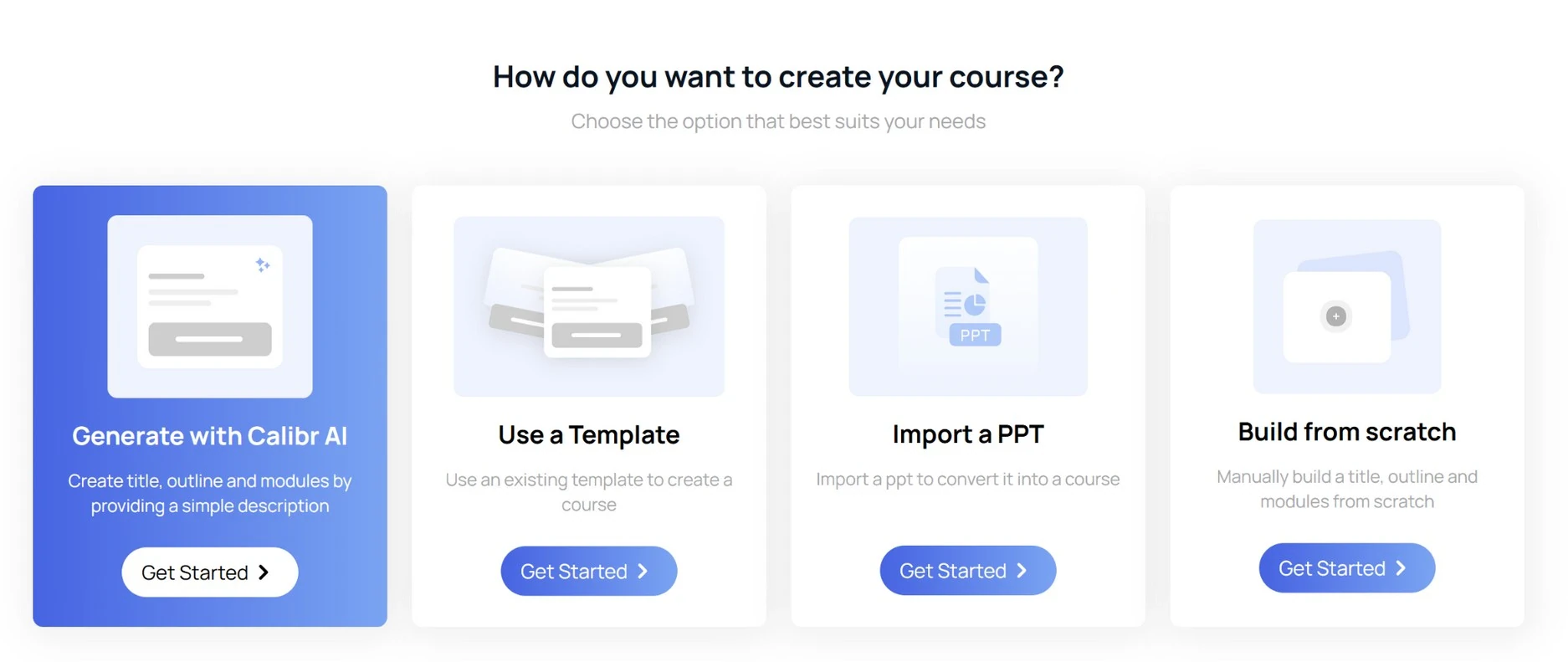
How does Calibr handle AI-powered content creation?
Drag-and-drop course builder enables anyone to create professional courses in minutes without technical expertise.
Built-in content library with thousands of customizable templates, slides, and interactive elements ready to deploy.
AI-powered content suggestions automatically recommend relevant materials based on learning objectives and learner profiles.
Multi-format support including video, SCORM, xAPI, interactive assessments, documents, and embedded external content.
Real-time collaboration features allow multiple authors to work simultaneously with version control and comment threads.
Microlearning focus with tools specifically designed for creating bite-sized, mobile-optimized learning moments.
"The course authoring tool of Calibr is very intuitive and easy to use. The user interface is very simple and minimalistic."
How does Blackboard handle content creation?
Course creation tools designed for academic curriculum with detailed syllabus management.
Content editor supports multimedia but requires more technical knowledge for advanced formatting.
Course creation involves more manual effort due to limited automation and intelligent guidance.
Reusable learning objects can be shared across courses but setup requires administrator involvement.
Blackboard’s content marketplace offers publisher resources for academic courses.
"Creating assessments can be streamlined in a better way to create questions of different types more flexibly and rapidly. I recommend having a tool to do MCQ grading integrated in the Blackboard LMS. Moreover, integrating video editing tools into the LMS itself would be a great addition as well."
Why Choose Calibr Over Blackboard for Content Creation?
Personalized Learning Paths & Adaptive Learning
Deliver customized learning experiences that adapt to individual needs
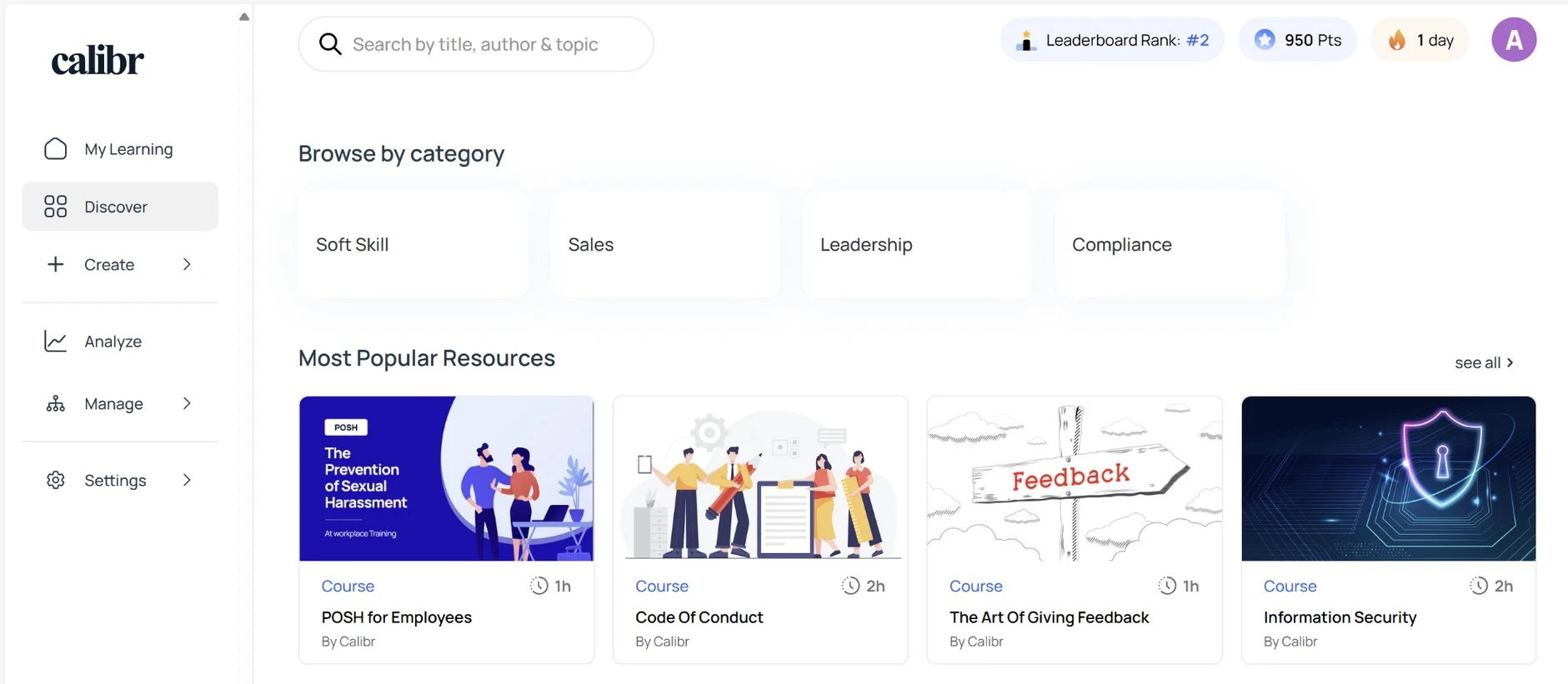
How does Calibr deliver personalized learning?
AI-driven learning paths automatically adjust based on individual performance, role requirements, and career goals.
Smart recommendations surface relevant content from your entire library based on skills gaps and learning history.
Competency-based progression allows learners to skip mastered content and focus on development areas.
Role-based curriculum automatically enrolls users in relevant training based on their job function and department.
Dynamic difficulty adjustment ensures content remains challenging but achievable for optimal engagement.
Personalized dashboard shows each learner their unique path, progress, and recommended next steps.
"Learning with Calibr has been an absolute game-changer. The AI recommendations feel like having a personal learning advisor."
How does Blackboard deliver personalized learning?
Adaptive release, retention alerts, and notifications rely largely on predefined rules and thresholds, with limited real-time or AI-driven personalization compared to modern learning platforms.
Learning modules can be structured with prerequisites to guide students through material sequentially.
Performance dashboard provides overview of progress across enrolled courses.
Dashboards and Predict analytics emphasize grades, attendance, and course completion rather than business impact, skill proficiency, or role-based capability development.
These features are optimized for student monitoring and course progression in educational institutions, making them less adaptable to corporate L&D or skills-based workforce training needs.
Why Choose Calibr Over Blackboard for Personalized Learning?
Analytics, Reporting & ROI Measurement
Transform learning data into actionable business intelligence
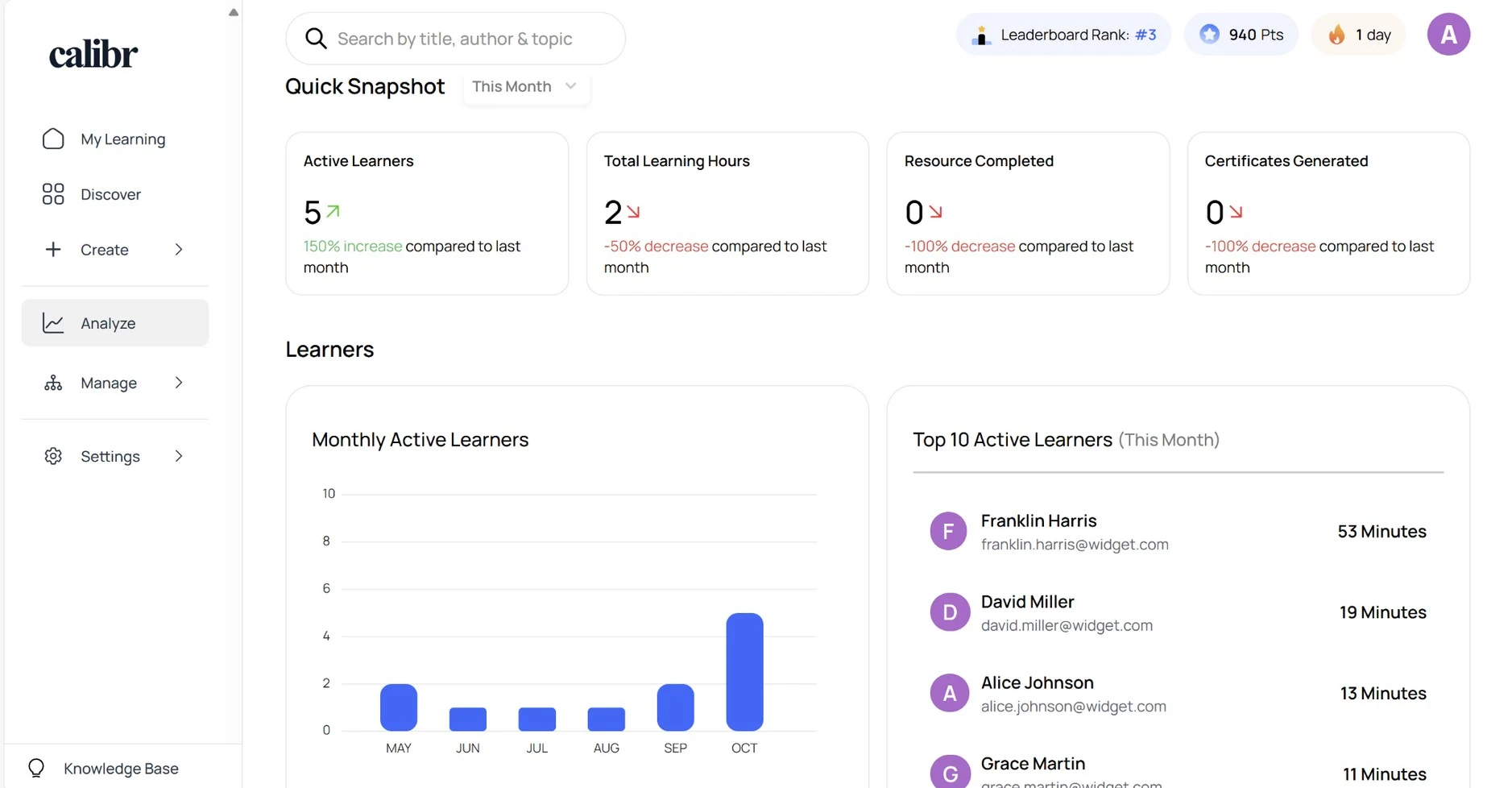
How does Calibr handle analytics & reporting?
Calibr provides enterprise-grade analytics that transform learning data into actionable business intelligence.
Real-time executive dashboard displays business-critical metrics including completion rates, engagement scores, and skill development.
Custom report builder allows any user to create tailored reports with drag-and-drop fields without IT support.
Predictive analytics identify learners at risk of non-completion and trigger automated intervention workflows.
ROI calculator tracks training costs against performance improvements, revenue impact, and retention metrics.
Exportable data in multiple formats (CSV, PDF, Excel) with scheduled automated delivery to stakeholders.
Skill gap analysis visually maps current capabilities against target competencies across teams and departments.
"Analytics and reporting — overall, Calibr is a comprehensive and user-friendly learning management solution that provides organizations with a wide range of features and capabilities."
How does Blackboard handle analytics & reporting?
Reporting and dashboards focus primarily on grades, participation, and course-level metrics, which limits their applicability for skills tracking, business outcomes, or workforce performance analysis.
Advanced data exports and institutional-level analytics often require administrator access or technical configuration, reducing flexibility and self-service reporting for instructors or training teams.
Course reports show engagement metrics including login frequency, content access, and assignment submission rates.
Performance dashboard offers overview of course-level statistics for instructors.
Retention analytics identify potential risk indicators using participation and academic performance data.
"The reporting tool still needs to improve which I am sure will be on their priority list. This is one of the area where pulling the report still depends on tools like Illuminate, Power BI and/or Direct Database."
Why Choose Calibr Over Blackboard for Analytics?
Affordable, Transparent Pricing
Budgeting without surprises. No hidden fees, predictable scaling costs.
Calibr Pricing
Transparent, predictable, all-inclusive
14 days, no credit card required
Value Proposition:
- ✓ No hidden fees for standard features
- ✓ Predictable scaling costs
- ✓ All-inclusive platform
- ✓ ROI in 10.1 months
"Good value for money. Very easy and flexible learning platform for small teams"
Blackboard Pricing
"The cost of blackboard was slightly higher than other LMS options so upper management decided to switch out blackboard to another LMS."
User Experience & User Experience
Intuitive, easy-to-navigate design
How does Calibr handle User Interface & User Experience?
Responsive design that adapts well across multiple screen sizes.
Clean, modern interface following contemporary design principles with intuitive navigation requiring zero training.
Intuitive navigation structure allows users to find courses, track progress, and access resources without training or documentation.
Customizable branding allows complete white-labeling with your colors, logo, and visual identity throughout.
Personalized dashboards display individual learning paths, progress, deadlines, and recommendations.
Single-click access to most common tasks with thoughtfully organized menus and smart defaults.
Integrated badges, points, leaderboards, and achievement systems drive engagement through healthy competition and visible recognition of learning accomplishments.
"The UIUX is simple yet appealing which means it makes it easier for the user to navigate throughout"
How does Blackboard handle User Interface & User Experience?
Traditional LMS interface familiar to those with academic background but steep learning curve for new users.
Navigation can be complex with multiple clicks required to access common functions and deep menu structures.
Customization options available but often require technical expertise and administrator-level access to implement.
Interface patterns vary across modules, reflecting the platform’s gradual evolution over time.
Accessibility features present but require careful configuration and ongoing maintenance to remain compliant.
"UI could be updated to be more user-friendly, e.g., minimise clicks, add more shortcuts for site navigation."
"The user interface design is a bit outdated compared to nowadays LMS platforms. I think the colors, fonts, and the overall interface can be improved."
Why Choose Calibr Over Blackboard for User Interface & User Experience?
Mobile Learning
Learn anytime, anywhere
How does Calibr handle Mobile Learning?
Native Mobile Applications: Purpose-built iOS and Android apps deliver native mobile experiences optimized for touch interfaces, providing faster performance and better user experience than web-based alternatives.
Offline mode allows downloading content for learning without internet connectivity with automatic sync when reconnected.
Mobile-First Content Design: All content automatically optimizes for mobile viewing with responsive layouts, appropriately sized touch targets, and mobile-friendly interactions that don't require desktop functionality.
Push notifications keep learners engaged with timely reminders, new content alerts, and achievement celebrations.
Progressive web app (PWA) technology provides app-like experience without app store downloads or updates.
Mobile Analytics: Track mobile learning engagement separately to understand how your distributed workforce prefers to learn and optimize content delivery accordingly.
Mobile-optimized assessments with touch-friendly interactions, voice input options, photo uploads for assignments, and gesture-based navigation.
"The course content, highly available- multi device support and easy to follow course guidelines."
How does Blackboard handle Mobile Learning?
Blackboard mobile app available for iOS and Android with core functionality accessible.
Offline content access limited and requires instructor to enable specific materials for download.
Notifications available for grades, announcements, and course updates through the mobile app.
Content accessibility on mobile varies depending on how courses were originally created and formatted.
Discussion boards and collaboration tools accessible through mobile app with simplified interface.
"With the more frequent use of mobile devices, Blackboard needs to be more mobile-friendly. Some screens, such as the grade book, offer limited functionality when accessed on a mobile device such as an iPad."
Why Choose Calibr Over Blackboard for Mobile Learning?
Measurable Business Impact: The Numbers Don't Lie
Calibr, the best alternative to Blackboard, delivers measurable business value across industries — from faster implementation to higher learner engagement
What Our Customers Say
Discover how organizations worldwide are transforming their learning experiences and achieving remarkable results with Calibr
"Learning with Calibr has been a game-changer. I used to miss the freedom of exploring libraries and curating my own learning path—something most traditional platforms never truly offered. But Calibr brings that experience into the digital age and takes it several steps further. With expertly designed courses by seasoned industry professionals, I’m not just gaining knowledge—I’m getting real-world insights and exposure that older platforms simply can’t match."
Neha P
Project lead
"Outstanding LXP, providing excellent service, from the initial solutioning to onboarding and on-going support. We especially like the scalability that it offers us. The platform has enabled our organisation to scale, providing online, accessible knowledge repositories to our sales force and their course authoring tool allows us to create customised learning pathways for our workforce."
Bhasker P
Associate Director - Human Resources
"The UIUX is simple yet appealing which means it makes it easier for the user to navigate throughout. Apart from the category of Courses and Videos I also liked the addition of "Books" as a category. This means that the platform caters to not only learners who like to upskill through audio-visuals but reading too! Basically makes it customizable to different learners"
Vishwa B
Human Resource Associate
Companies Trust Us
Learners
Customer Satisfaction
Average Rating
How Calibr Solves Day-to-Day and Long-Term L&D Challenges?
Short-Term Impact
Organizations moving from Blackboard Learn to Calibr quickly eliminate common operational frustrations. Routine tasks such as user enrollment, reporting, and course management are completed in seconds through Calibr’s intuitive interface, reducing administrative effort. Learners benefit from a modern, mobile-optimized experience that aligns with today’s digital expectations, while the platform’s simplicity significantly lowers support requests—allowing L&D teams to focus on strategic priorities rather than system management.
Long-Term Transformation
Calibr is purpose-built for modern corporate learning and supports long-term organizational growth. Its AI-driven insights help identify skill gaps and evolving training needs early, enabling more proactive learning strategies. The platform scales seamlessly without disruptive upgrades or complex maintenance, and its agile product development ensures regular enhancements aligned with business requirements. Together, these capabilities position Calibr as a strong, future-ready alternative to Blackboard Learn for corporate training environments.
Why Does This Matter for Decision-Makers?
Calibr doesn't just solve today's training challenges — it builds the foundation for continuous organizational learning and growth.
Why Calibr is the best alternative to Blackboard?
Explore how switching to Calibr drives measurable impact and why it serves as a top alternatives to Blackboard and other LMS solutions
FRUSTRATION
- Complex navigation.
- Academic-first design.
- Slow content creation.
- High support dependency.
SWITCH
- Corporate-ready platform.
- Modern user experience.
- Faster implementation.
- Minimal training needed
MIGRATION
- Guided onboarding support.
- Content migration assistance.
- Minimal operational disruption.
- Quick user adoption.
IMPACT
- 10x faster course creation
- 45% skill growth rate
- 40% better knowledge retention
- Scalable, future-ready learning platform for modern organizations
Making the Move from Blackboard? We've Got You Covered
Our migration experts handle everything — so your learning never skips a beat.
Top 5 Reasons Organizations Choose Calibr Over Blackboard
AI-Powered Course Creation
Create Courses 10X Faster With Built-In AI
Calibr’s AI generates course outlines, quizzes, scenarios, and learning objectives in seconds, enabling faster, high-quality training development and helping teams scale learning efficiently.
True Cloud Collaboration
Work Together in Real Time — No Files, No Delays
Calibr’s cloud-native platform lets multiple authors build the same course simultaneously. Real-time comments, shared assets, and integrated review workflows eliminate version issues and slow handoffs. Distributed teams move faster with complete transparency and smoother coordination..
Seamless Scalability
100 to 500,000+ Users
From 100 to 500,000 learners, Calibr delivers consistent performance without added costs or system slowdowns — making it ideal for growing enterprises and global teams.
Transparent, All-Inclusive Pricing
No Hidden Fees, No Maintenance Costs
With Calibr’s subscription model, all features, updates, and support are included. Pricing stays predictable and easy to budget, with no hidden fees or surprise maintenance costs. Organizations benefit from a lower, clearer, and more manageable total cost of ownership.
Zero Infrastructure Burden
Fully Browser-Based — Nothing to Install
Calibr requires no software installation or IT setup. Updates happen automatically, and the platform works on any device with a browser. Teams gain flexibility to work from anywhere while reducing IT workload and compatibility issues.
Trusted by Leading Organizations Worldwide
Join thousands of companies that trust Calibr to power their learning and development initiatives.
















Frequently Asked Questions
Everything you need to know about choosing between Calibr and Blackboard