A Step-by-Step Guide to Converting Company Documents into Microlearning Using AI
Most organizations have great training material locked in documents nobody learns from. This guide walks L&D teams through a practical, step-by-step process for using AI to convert those documents into effective microlearning — without sacrificing instructional quality.
TL;DR:
Converting company documents into microlearning courses makes training more engaging, accessible, and effective.
Traditional documents are hard to retain; microlearning breaks content into short, focused modules that improve engagement and knowledge retention
Key steps include identifying core content, chunking it into bite-sized lessons, and adding interactive elements like quizzes and visuals
Formats like videos, infographics, and scenario-based learning enhance understanding and real-world application
AI-powered platforms (like Calibr) automate conversion, personalize learning paths, and speed up course creation
This approach leads to faster onboarding, better compliance training, and scalable, continuous employee learning
Most L&D Teams Don't Have a Content Problem. They Have a Conversion Problem
Here's a scenario I've heard from almost every L&D leader I've spoken to in the last two years.
The company has hundreds of documents — onboarding guides, SOPs, compliance policies, product manuals, process decks. They live in shared drives, Confluence pages, or SharePoint folders. They were written carefully, updated periodically, and are technically available to every employee.
And almost no one reads them.
When new hires join, they get a link to a folder and are expected to absorb thirty documents in their first two weeks. When a compliance deadline approaches, employees are asked to "go through" a fifty-page policy PDF. When a product update rolls out, the sales team gets a deck in their inbox with a note saying, "Please review before your next call."
The content exists. The learning doesn't happen. And the performance gap stays open.
AI has changed the economics of fixing this — not by creating content from scratch, but by helping L&D teams do something they've always needed to do: take what already exists and turn it into something that actually teaches.
So let me walk you through exactly how to do it.
The Problem with Treating Documents as Training
Documents are written to inform. Courses are designed to teach. It's a distinction I've seen ignored repeatedly, and it's usually where training programs start losing people.
A well-written SOP tells you what to do and in what sequence. It doesn't explain why each step matters, help you anticipate where you might go wrong, or give you a way to check whether you understood it correctly. It transfers information. It doesn't build capability.
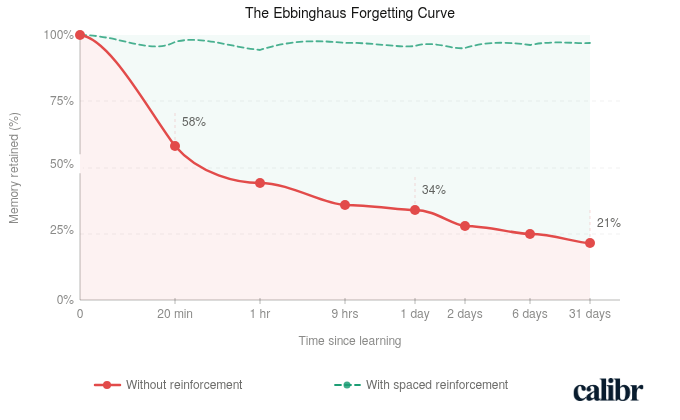
There's also a more fundamental issue that learning science identified long ago. Ebbinghaus showed us that without reinforcement, people forget the majority of new information within a day or two. A document someone skims on their first week — with no retrieval, no application, no follow-up — doesn't stand a chance against that curve. You can write the clearest SOP in the world and still have employees who can't act on it a week later, not because they were careless, but because that's just how memory works.
Documents compound this problem structurally. They're written for completeness, not for working memory — everything gets included at the same visual weight, with no hierarchy that signals what actually matters most. There are no objectives built in, no moments of application, no checkpoints. Reading is passive. Learning requires retrieval.
The content in those documents usually isn't the problem. The container is. That's exactly the gap AI helps close.
Before You Convert Anything, Know What You're Building
Microlearning often gets used as a catch-all term, so let me be specific about what I mean here.
A microlearning module is a short, focused learning unit — typically three to seven minutes — built around a single, clearly defined learning objective. It delivers one idea, skill, or process, and gives the learner a moment to apply or recall it before they move on.
Effective microlearning starts with a single clear objective per module. Not "understand our onboarding process" — something more precise, like "identify the three approvals required before a new vendor is added to the system." One objective. One module. Everything in it serves that objective.
From there, the content gets mapped tightly to that objective — and everything else gets cut. That's usually the hardest part. When you're working from a comprehensive document, leaving things out feels wrong. But inclusion is the enemy of focus, and focus is what makes microlearning work.
The third element is a moment of application or recall at the end — a quiz, a scenario, a checklist. Something that asks the learner to actually do something with what they've just encountered, not just receive it. This is what separates a learning experience from a reading experience.
AI accelerates production. It does not replace instructional thinking. If you drop a 40-page SOP into an AI authoring tool without a design lens, you'll get a faster version of the same problem — content that's been reformatted but not restructured for learning. The workflow below is designed to keep the instructional logic in your hands while letting AI handle the heavy lifting.
A Practical Workflow for Converting Documents into Microlearning
Step 1: Audit and Select the Right Documents
Not every document is worth converting, and trying to convert everything at once is a reliable way to burn out your team and produce mediocre content across the board.
Start with a simple prioritization filter. Ask three questions about each candidate document: Is there a measurable performance gap tied to this knowledge area? How many people need it, and how often? If employees genuinely understood this better, would it change how they work?
If the answers point clearly to yes, that document earns a spot on your list. Compliance training, onboarding content, product knowledge for customer-facing roles, and process documentation for high-turnover positions tend to be the highest-value starting points. Reference documents that experienced employees occasionally consult can wait.
Step 2: Define Learning Objectives Before Touching Any AI Tool
This is the step most teams skip, and it's the one that determines whether the output is a course or just a cleaner document.
Before you feed anything into an AI tool, sit with the source material and ask: what should someone be able to do differently after going through this? Not what should they know — what should they do, decide, or handle?
Bloom's Taxonomy is a useful frame here, even at a basic level. Are you aiming for recall ("list the steps in the approval process")? Application ("complete a vendor onboarding form correctly")? Judgment ("evaluate whether a vendor meets our compliance criteria before escalating")? Write one to three objectives per module before you open any authoring tool. These objectives will drive everything — what content you include, what you cut, and what kind of assessment makes sense at the end.
In my experience, teams that skip this step always end up redoing the work later. The AI output feels off, but they can't articulate why. The reason is almost always that there was no objective anchoring the design in the first place.
Step 3: Chunk the Source Document
Now you break the document apart.
Identify the natural seams in the source material — where one topic ends and another begins. Each chunk should be able to support one learning objective independently. One process or workflow, one module. One policy area, one module. One product feature, one module.
Cut aggressively as you go. Remove legal boilerplate that doesn't change learner behavior. Remove edge cases that apply to a tiny fraction of situations — those can live in a reference document. Remove anything that exists for audit purposes but doesn't actually need to be learned.
What you're left with should feel lean. The core of what a learner needs to achieve the objective, and nothing more. Most teams underestimate how much can be cut without any loss to learning quality. Usually quite a lot.
Step 4: Use AI to Draft the Course Content
Now, finally, you bring in AI.
Feed each chunk into an AI-powered authoring tool or a capable language model with a structured prompt. The prompt matters more than most people realize — a vague input produces a vague output, and I've seen teams waste hours fixing AI drafts that were only poor because the prompt gave the tool nothing to work with.
A structure that tends to work well: "The audience is [role]. The learning objective is [specific objective]. The source content is below. Rewrite this as a short, clear learning module in plain language. Organize it with a brief intro, three to five key points, and a summary. Avoid jargon."
What AI does well here: it reorganizes dense content into a more logical teaching sequence, simplifies language without losing accuracy, generates clear explanations of complex processes, and produces first drafts of narration scripts or slide text quickly. What it doesn't do: verify that the content reflects how the work is actually done on the ground, or catch the place where a simplification has quietly crossed into inaccuracy.
Treat the AI output as a strong first draft, not a finished course.
Step 5: Add an Interaction or Assessment Layer
Every module needs at least one moment where the learner has to do something.
This doesn't need to be elaborate. A three-question knowledge check at the end of a five-minute module is enough to shift the experience from passive to active — and to start countering that forgetting curve. A scenario-based question that asks the learner to make a decision using what they've just encountered is even better.
AI can generate first drafts of assessments too. Give it the objective and the key content points and ask it to produce a set of multiple-choice questions or a short scenario. Then review each one carefully.
Check that the distractors in MCQs are plausible but clearly wrong. Check that the correct answer isn't gameable based on sentence length or position. And check that the questions actually test understanding, not just reading comprehension. A question that can be answered correctly without having learned anything isn't an assessment. It's a checkbox.
Step 6: Review with a Subject Matter Expert
Speed is only valuable if accuracy is preserved.
Before any AI-assisted module goes live, a subject matter expert needs to review it. This doesn't have to be a lengthy process — if the chunking and objective-setting was done well, each module is short and focused, which makes SME review faster than most people expect.
Give your SME a simple brief: Is everything here factually accurate? Does it reflect how this process actually works in practice, not just how it's documented? Is anything critical missing, or anything overstated that's likely to cause confusion?
AI tools can confidently produce content that sounds right but isn't — particularly in technical, regulatory, or nuanced process content. That's not a reason to avoid AI. It's a reason to build SME review into your workflow as a non-negotiable step, not an optional one you skip when you're under deadline.
Step 7: Publish and Connect to a Learning Path
A standalone module has limited impact. A module that sits inside a logical sequence — where what comes before it builds context and what comes after extends application — is where learning compounds.
Once a set of related modules is ready, sequence them intentionally. Start with foundational concepts before asking learners to apply them. Move from simple to complex. End with something that requires judgment or synthesis, not just recall.
Where possible, connect module completion to a measurable outcome — a certification, a performance milestone, a role-readiness marker. This isn't just good practice for accountability. It's also how you build a credible case for L&D investment when leadership asks what the training is actually producing.
What to Watch Out For
Let me be honest about where this process tends to break down in practice, because the failure modes are fairly predictable.
The most common one: treating AI output as final. Teams move fast, the draft looks polished, and it goes live without proper review. This almost always creates problems downstream — especially in compliance or technical content where small inaccuracies have real consequences.
The second is trying to convert everything at once. I'd strongly recommend against this. Pick one document, run it through the full workflow, and learn from it before you scale. Moving fast on a flawed process just means producing mediocre content faster.
The third is skipping the objective-setting step — which I've already mentioned, but it bears repeating because it's so commonly skipped. Without clear objectives, there's no design logic guiding what to include or cut. The output looks like a course and functions like a document.
And the last one worth flagging: leaving out the SME review in the name of speed. I've seen this cause real problems. The SME is the accuracy layer that holds the whole thing together — cutting that step is a trade-off that usually costs more than it saves.
From Conversion to Business Impact: How to Know If It's Working
Most L&D teams track completion rates and quiz scores. These are output metrics — they tell you whether people went through the course, not whether anything changed.
The more useful question is: what was the performance gap before this training existed, and did it close?
For a customer-facing team, look at call quality scores or product knowledge assessments before and after training. For onboarding, track time-to-first-independent-task. For compliance, watch error rates or audit findings over the following quarter.
The goal isn't perfect measurement — it rarely is in L&D. It's enough signal to know whether the training is doing what it was designed to do, and to have a credible story to tell when someone asks. That story is also how L&D moves from being seen as a cost center to being seen as something that actually moves business outcomes.
Pick one document this week. Write two learning objectives. Chunk it. Draft it with AI. Have a colleague or SME review it. The process is more straightforward than it sounds — and once you've run it once, it becomes genuinely repeatable at scale.
Frequently Asked Questions (FAQ's) About Converting Documents into Microlearning
What does converting company documents into microlearning courses mean?
It means transforming long, static documents into short, focused learning modules. These bite-sized lessons are easier to consume, improve engagement, and help employees retain information more effectively compared to traditional document-based training.
Why is microlearning more effective than traditional document-based training?
Microlearning is more effective because it delivers content in short, focused bursts that are easier to understand and remember. It reduces cognitive overload, increases engagement, and allows learners to access information quickly when needed.
How can you convert documents into microlearning courses?
You can convert documents by identifying key information, breaking it into smaller topics, and turning each into a focused lesson. Adding visuals, quizzes, and real-life scenarios further enhances engagement and improves knowledge retention.
What types of content work best for microlearning formats?
Content such as training manuals, SOPs, onboarding documents, and compliance materials work well for microlearning. These can be transformed into videos, infographics, quizzes, or interactive modules for better understanding and application.
What are the benefits of converting documents into microlearning?
Converting documents into microlearning improves engagement, knowledge retention, and accessibility. It also speeds up onboarding, supports continuous learning, and ensures employees can quickly apply knowledge in real work scenarios.
How do AI-powered platforms help in creating microlearning courses?
AI-powered platforms automate the process of converting documents into structured learning modules. They can personalize learning paths, recommend content, and reduce the time and effort required to create and deliver training programs.
What should you look for in a platform to convert documents into microlearning?
Look for features like content automation, AI-driven personalization, analytics, and easy course creation. A good platform should also support multiple content formats and integrate seamlessly with existing training systems.
Why should organizations consider platforms like Calibr for microlearning?
Platforms like Calibr simplify the conversion of documents into microlearning courses with automation and intuitive tools. They help organizations deliver personalized, scalable training while improving efficiency and learning outcomes.


Anand is Co-founder of Calibr, an AI-native corporate learning platform that helps HR and L&D leaders close skill gaps and build future-ready workforces. He has spent over two decades working across technology, digital marketing, and education — and writes regularly on L&D strategy, instructional design, and the role of AI in workplace learning.